Open source · MPL-2.0 · self-hosted

Your Minecraft servers.
Your infrastructure.

Run your Minecraft servers in isolated containers, on your own hardware or in the cloud. One self-hosted panel for your worlds, players and modpacks.

git clone https://github.com/athNdev/carbonpanel && cd carbonpanel
Vanilla Paper Purpur Spigot Bukkit Fabric Quilt Forge NeoForge Folia Pufferfish Bedrock Geyser Floodgate

Play your way

Vanilla, Paper, Fabric, Forge and more.

11+ server types

Rest. Then resume.

Let idle servers sleep and wake on join.

Wake-on-connect

Your machines

At home, in your homelab or on a VPS.

One self-hosted panel

Open by design

Inspect it, adapt it and make it yours.

MPL-2.0 licensed

More than start and stop

Make the world yours.

Build the pack your friends want to play. Shape the world. Let changes wait for the right moment, and idle servers rest.

01 / MODPACK STUDIO

Build a modpack.
Share it your way.

Create a pack, choose a Minecraft version and loader, search for mods, and resolve dependencies in one place. Export in formats such as .mrpack and packwiz to share your pack with friends or a community.

Create in StudioMultiple formatsReady to share
02 / DATAPACKS

Find a datapack.
Add it to your server.

Search for datapacks inside the panel, browse the results, and install a pack on your server. Upload your own ZIP too, with pack-format warnings to help spot compatibility issues.

Search in the panelAdd to your serverZIP uploads
03 / STAGED UPDATES

Prepare the update.
Pick the moment.

Queue compatible configuration and content changes in one staged batch. Apply them on the next restart, at a scheduled time, or after an idle window, instead of interrupting everyone for each edit.

One batchNext restartScheduled or idle
04 / SLEEP & WAKE

Let it sleep.
Join to wake it.

Choose how an empty server rests. Native pause stops ticking on supported versions. Freeze suspends the process in memory. Deep sleep stops it to release JVM memory, then a player connection starts it again.

PauseFreezeDeep sleepWake on join

Feature illustrations · example content · Explore the documentation →

A view of what's running

Your worlds. In view.

A little less administration. A little more time to play.

Product concept · example data · interface in development

Product tour

The panel, up close.

Real captures from a disposable demo stack, regenerated automatically whenever the console changes.

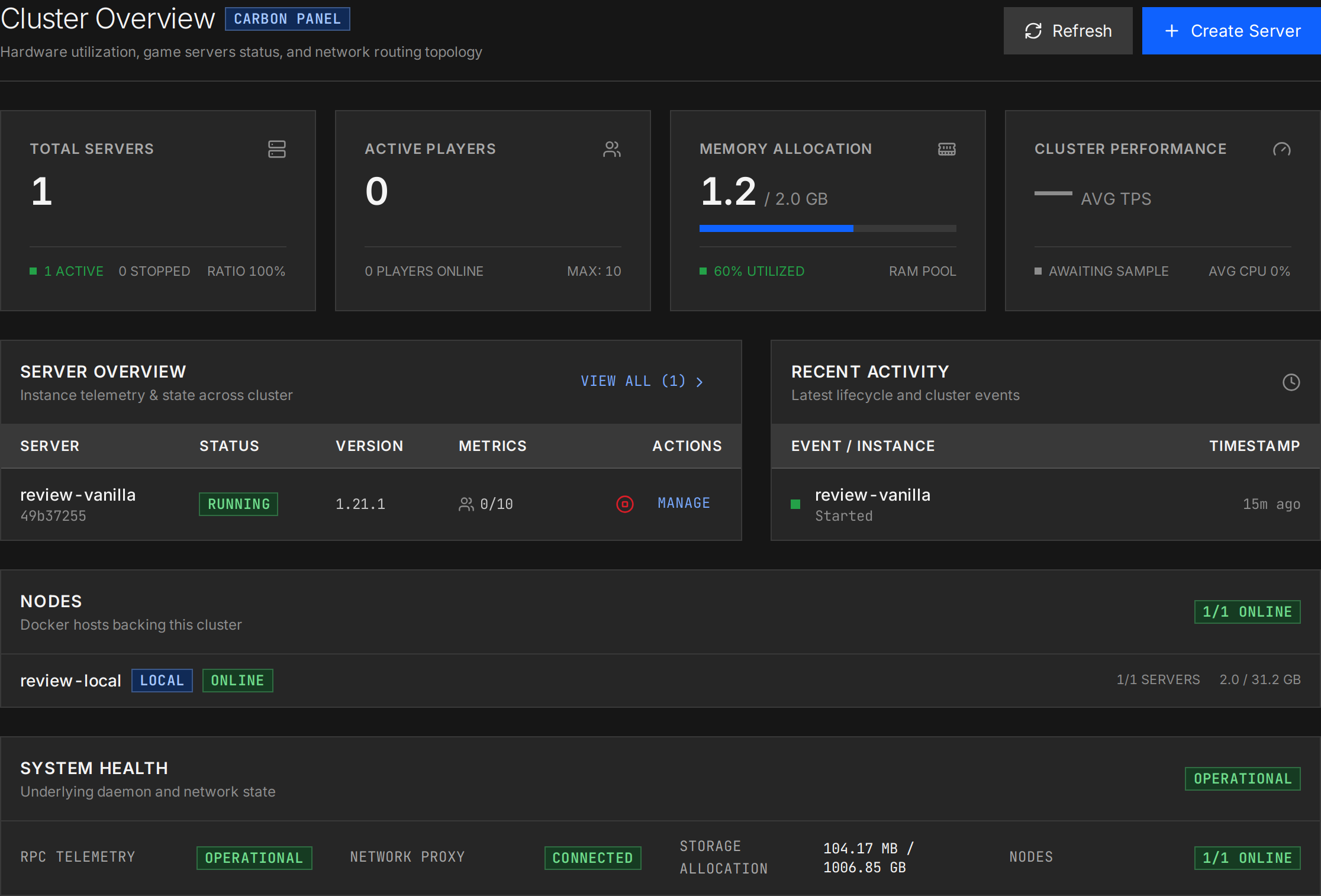
Dashboard

Know your cluster at a glance

Live tiles for servers, players, memory, and TPS, with node inventory and system health on the same screen.

Cluster overview dashboard with KPI tiles, a server overview table, node inventory, and the system health strip

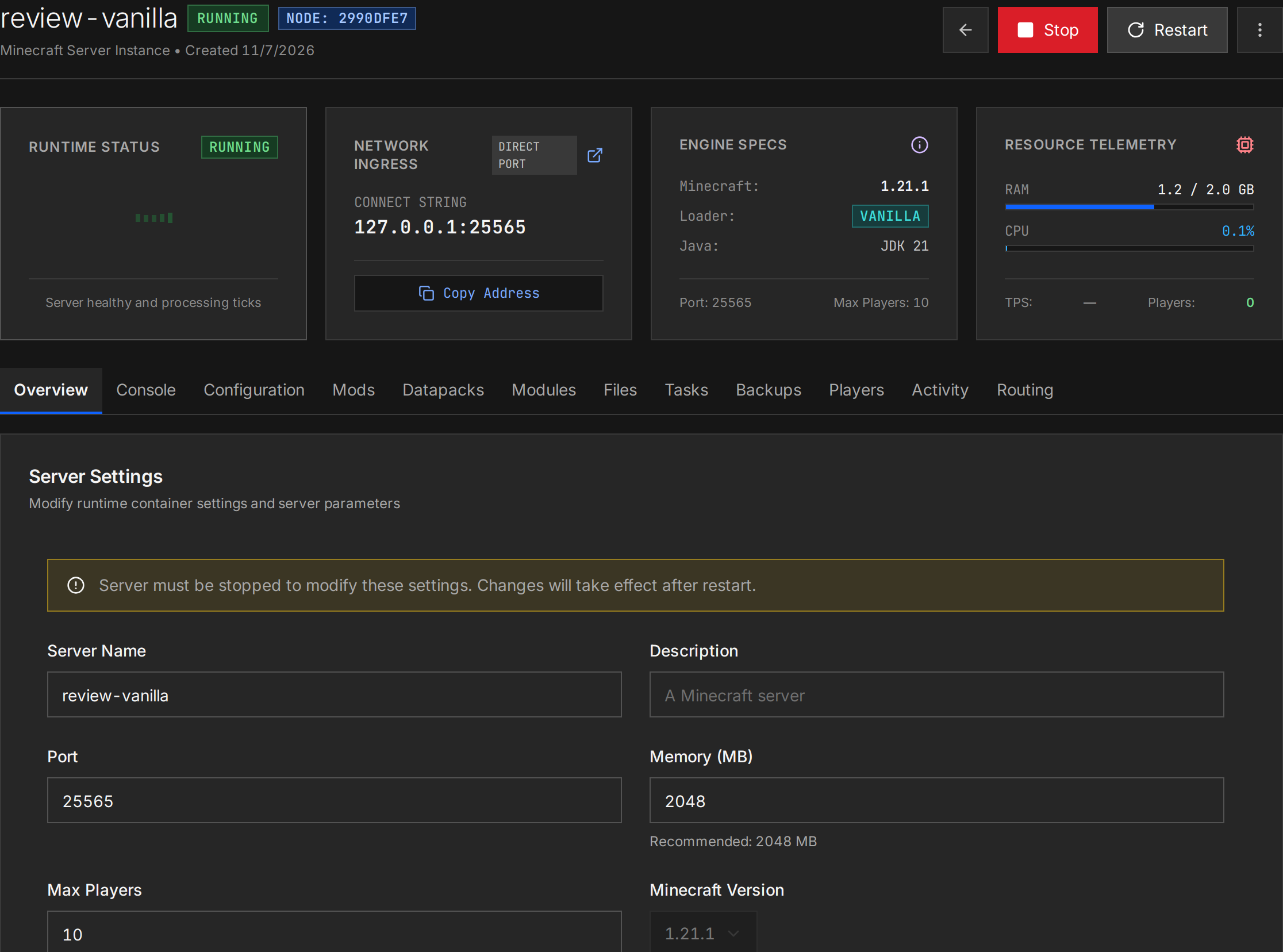
Server detail

Catch problems before players do

Per-server heartbeat, connect address, engine specs, and resource telemetry above the full tab strip.

Server detail with runtime status, connect address, engine specs, resource telemetry, and the full tab strip above the settings panel

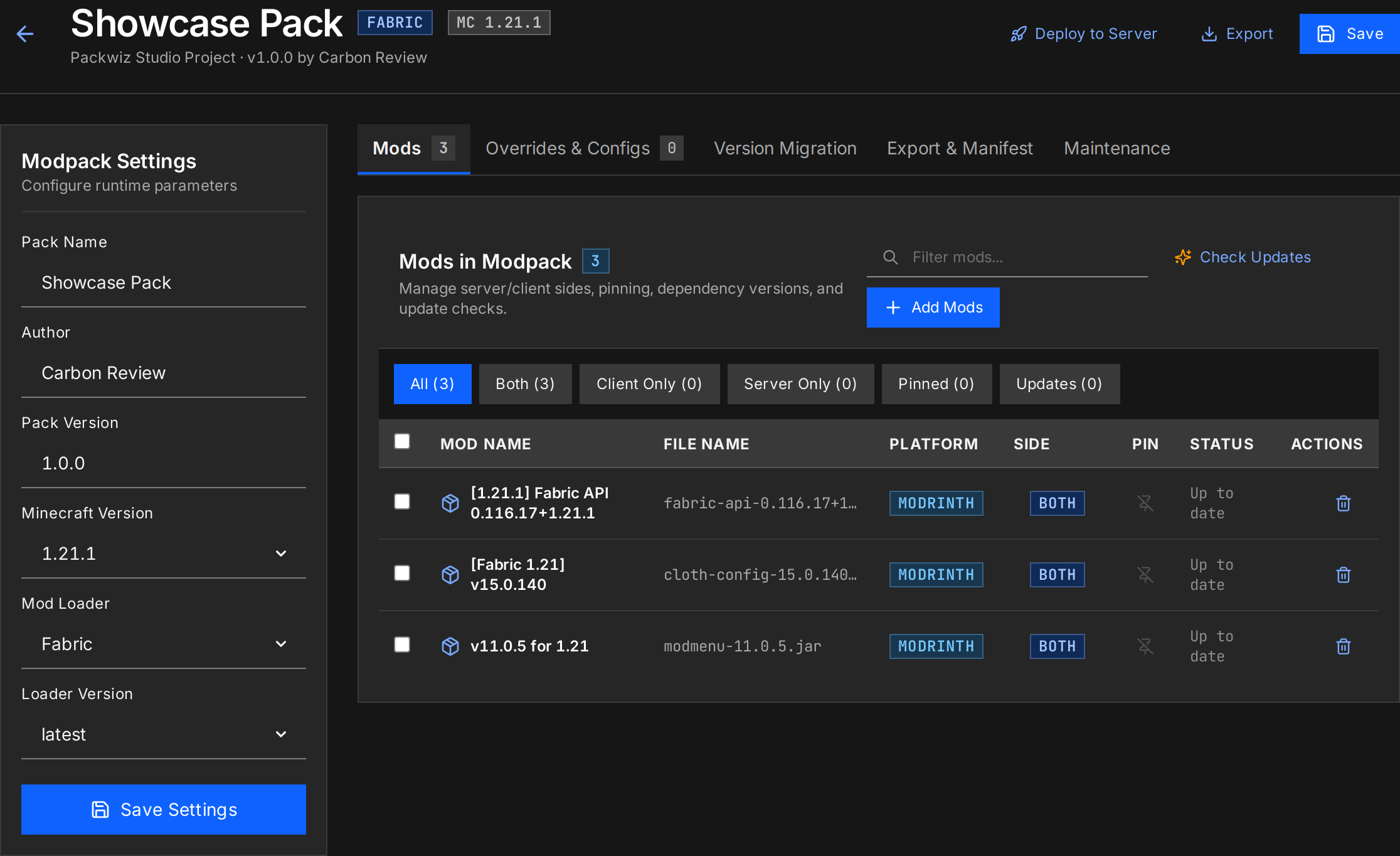
Modpack Studio

Ship a pack without touching a manifest

Mods, versions, sides, and update status in one workspace, with export options for every launcher format.

Modpack Studio workspace for the Showcase Pack with pack settings, editor tabs, and the installed mod list

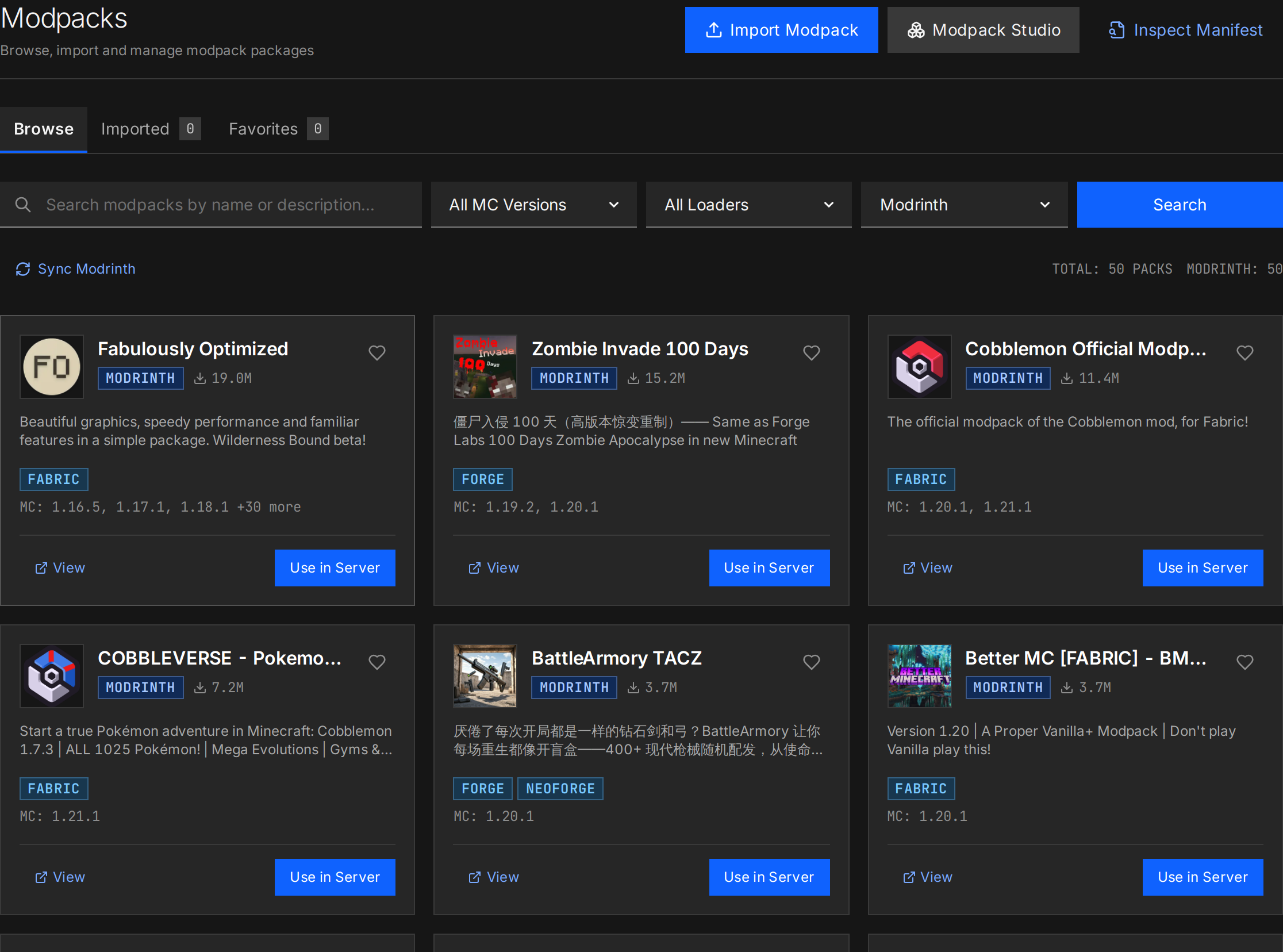
Modpacks

From discovery to running server in minutes

The Modrinth library with loader tags and version support, installable straight into a server.

Modpacks library grid with Modrinth packs, loader tags, supported versions, and one-click server install

Hosting servers shouldn't feel like babysitting.

One flaky plugin, one forgotten backup, one accidental rm -rf — and the whole night is gone. Carbon Panel treats your worlds the way production teams treat state: isolated, observable, and recoverable.

Other tools

Hand-rolled scripts and bare JVM processes on a shared host.

  • Shared environments can make failures harder to isolate
  • Port-forwarding a new server means editing firewall rules
  • Backups are a cron job nobody has ever restored from
  • Idle servers burn RAM all night, every night

Carbon

Every server is a Docker container with real limits, routes and history.

  • Each server runs in an isolated container
  • New server = new hostname, routed automatically
  • World-aware backups with retention and offsite copies
  • Stop idle server processes and wake on connection

A control plane, not a start button.

From container orchestration to modpack distribution, Carbon Panel ships the whole toolchain — opinionated where it matters, self-hosted everywhere.

Docker-native server management

Deploy vanilla, Paper, Purpur, Fabric, Quilt, Forge, NeoForge and Bedrock in seconds — each in its own container with CPU and RAM limits, automatic Java selection, and Aikar-tuned JVM presets.

One port, every server

A handshake-aware reverse proxy routes players by hostname through a single ingress — with Velocity forwarding, PROXY protocol, and Bedrock UDP built in.

On a server

Modpack Studio

Create a pack with mods from CurseForge and Modrinth, resolve dependencies, then export to .mrpack or packwiz to share it.

CurseForgeModrinthpackwiz

Live console & RCON

Stream ANSI-rendered logs over WebSocket with command history and an interactive RCON shell.

WebSocketANSImclo.gs

Full file manager

Browse, edit, zip and bulk-download files with resumable uploads and SHA-256 verified remote pulls.

resumablezip/unzip

Operations

Backups that restore

World-aware snapshots pause saves via RCON, respect retention rules, and push offsite to S3-compatible storage.

S3 / MinIOretention

Your machines, one panel

Add your home machine, a homelab box, or a cloud VPS as a node — then place each server wherever it makes sense. Routes and state stay in sync.

home labcloud VPSplacement

Automation & scheduling

Cron, interval and event-driven task chains — commands, backups, webhooks, even Chunky pre-generation and Git modpack updates.

cronchainswebhooks

Platform

Security & access

Role-based access control, OIDC single sign-on, scoped API tokens, invite links, and an audit log of everything.

RBACOIDCaudit

Typed, observable API

Protocol Buffers over Connect RPC & gRPC, with a live OpenAPI viewer, reflection, and Prometheus metrics endpoints.

Connect RPCOpenAPIPrometheus

Sleep, freeze, wake on join

Empty servers can freeze or stop their server process while the proxy continues answering pings. A player connection can wake the server again.

One panel. Every machine.

Carbon Panel runs Minecraft servers wherever you have machines — the PC in your room, a box in the closet, a VPS in the cloud — and manages them as one fleet behind one address.

  1. Players get one address.

    survival.yourdomain.com is all they ever type — one DNS record and one port, no juggling.

  2. The proxy routes every connection.

    The handshake names the destination, so each player lands in the right container on the right machine.

  3. Servers run where you have machines.

    Keep the always-on survival at home and burst event servers into the cloud — or the other way around.

  4. One control plane keeps it in sync.

    Routes, consoles and a typed API work identically across every machine — one panel, one view.

  5. Let idle servers rest.

    Stop idle server processes and wake them when players connect. The panel, proxy and host continue to use their own resources.

players survival.yourdomain.com Carbon Panel proxy :25565 handshake-aware routing control plane routes · console · API schedules · backups Home machine AT HOME survival-01 · 6 GB creative · 4 GB Cloud VPS IN THE CLOUD event-01 · 8 GB lobby-01 · sleep 0 B S3 · offsite backups world snapshots

Your machines, one view.

Bring your own hardware and manage Minecraft servers through one self-hosted panel. Choose the machine that suits each workload.

01 / HOME

A machine at home

Start with the computer or server you already run.

02 / HOMELAB

Room to grow

Organise server workloads across your own Docker nodes.

03 / CLOUD

Infrastructure you choose

Add a compatible remote machine when your setup needs it.

Node access, storage and recovery depend on your configuration. Review the documentation before moving or restoring world data.

From setup to your first players.

Run the panel on your own infrastructure with Docker and a browser.

1

Install the panel

Download Carbon Panel from GitHub and start it with Docker Compose. SQLite and the proxy are configured out of the box.

$ docker compose up -d
2

Create a server

Pick a loader and version, set CPU/RAM limits and JVM flags. Carbon provisions the container and its data volume.

› survival-01 · Paper 1.21 · 6 GB
3

Point players at it

Set a wildcard DNS record once. Every new server becomes a hostname — routed automatically on the single ingress port.

› survival.mc.yourdomain.com

Trust it with your worlds.

Every player connection crosses a checked boundary before it reaches a container — and every container is fenced from the rest of your cluster.

  • Handshake-aware ingress

    Routes resolve from the Minecraft handshake itself, with per-IP rate limiting.

  • Container isolation

    Resource limits, mounted data volumes, no host dependency sprawl.

  • Fail-closed access

    Casbin-backed RBAC, OIDC SSO, JWT sessions and a recovery key for offline admin.

Built for the way you host.

Choose your infrastructure, manage the servers you need, and keep your configuration in one place.

01 / CONTROL

Your infrastructure

Run the panel and server containers on infrastructure you manage.

02 / PLAY

Different worlds

Manage server types and modpacks for different communities.

03 / OPERATE

Tools for operators

Use a web console, routing, schedules and backup controls.

Free as in cost.
Free as in speech.

Carbon Panel is built in the open and can be self-hosted. Your worlds, your database and your infrastructure remain under your control.

Self-hosted, always

Runs on your hardware, your homelab, your VPS. No external control plane.

Your data is yours

Worlds and databases live in plain folders and volumes you can back up yourself.

No key required

CurseForge & Modrinth search works without you supplying an API key.

Observable

Prometheus metrics, an audit log and typed RPCs — instrument it like real infra.

Good to know.

Is Carbon Panel really free?
Yes. It's open source under the MPL-2.0 license — free to use, modify and self-host. There are no paid tiers, no seats, and no cloud account required.
Where are my worlds and data stored?
In plain directories and Docker volumes on your own storage — including an SQLite control database and per-server data volumes. Review configured integrations and offsite backups to understand where data is sent.
Which server types and loaders are supported?
Vanilla, Paper, Purpur, Spigot, Bukkit, Fabric, Quilt, Forge, NeoForge, Folia and Pufferfish for Java Edition, plus Bedrock support through built-in Geyser/Floodgate modules. Java runtimes (8, 11, 17, 21+) are selected automatically.
Do I need to port-forward every server?
No. Carbon Panel's built-in proxy multiplexes traffic through a single port (25565) and routes players by hostname — so survival.yourdomain.com and creative.yourdomain.com can reach different containers with one DNS setup.
Can I run it alongside other Docker workloads?
Yes. Carbon Panel orchestrates its own isolated server containers and can manage remote Docker nodes too. Each server runs in a container; review ports, storage and resource limits for your environment.
How do I get started?
Clone the repository and run it with Docker Compose, or build from source with Go and Bun. The getting-started guide walks through Docker Compose, Proxmox LXC, prebuilt binaries and source builds.

Give your servers a control plane.

Self-hosted, Docker-native, and open from the first commit. Spin up your first server today.